
Pro Field Tech — AI-Powered Appliance Repair Field Service Management Software
Field service management built exclusively for appliance repair — dispatch, jobs, technicians, warranty claims, and reporting in one platform.
Built for modern appliance service teams
Six modules. One connected platform.
Every module in Pro Field Tech shares data — jobs, technicians, parts, and claims stay in sync across dispatch, the field, and the back office.
Smart Dispatch
Daily scheduler & dispatch board
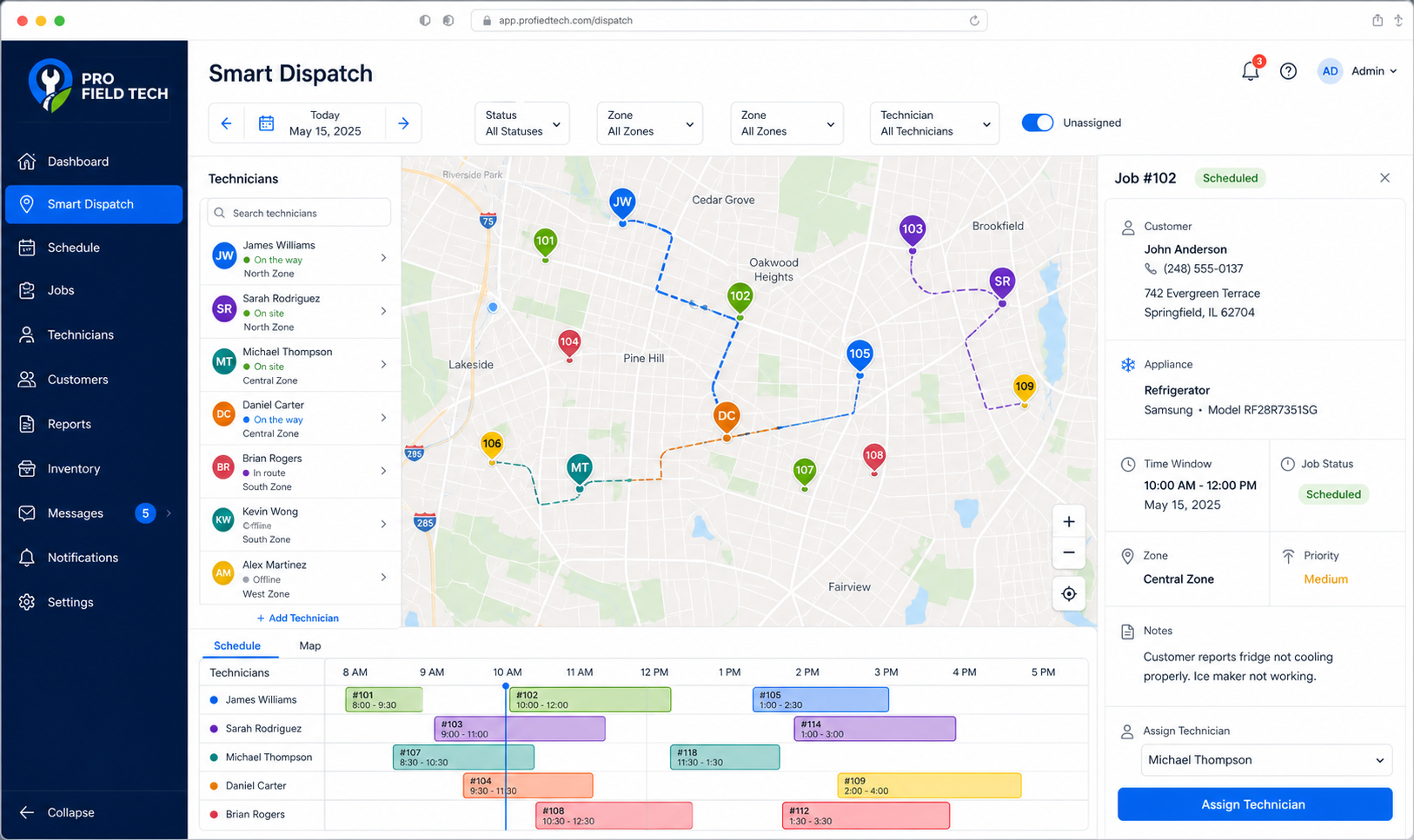
Map-based dispatch board with a daily scheduling grid. Assign jobs to technicians by zone, balance workload across your team, and optimize routes before sending anyone out.
- Live scheduling board with date navigation
- Technician workload view by day
- Zone-based job assignment
- Route optimization before dispatch
- Job queue management
1 of 6 modules
Schedule smarter. Dispatch in seconds.
Map-based dispatch board with a daily scheduling grid. Assign jobs by zone, balance technician workload, and review routes before anyone leaves the office.
- Map view with technician assignment pins and job locations
- Date, status, zone, and technician filters
- Daily schedule grid for reviewing and managing assignments
- Job detail panel with customer, appliance, and time window
- Unassigned job toggle to surface open work instantly
- Drag-and-drop assignment and conflict detection — planned features
AI Operations + Live Technician Tracking
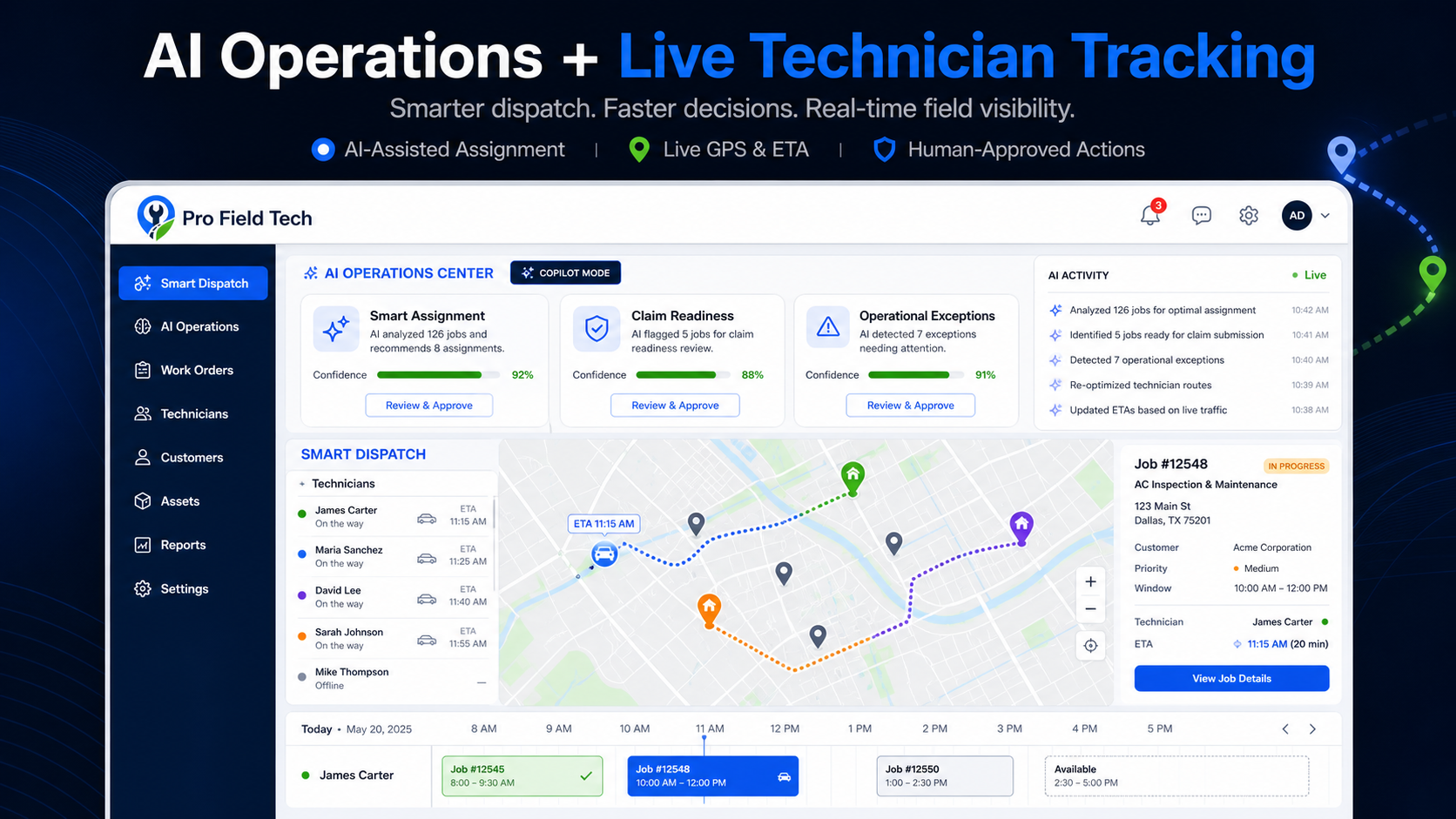
Turn real-time field activity into faster, smarter decisions. Pro Field Tech combines an AI Operations Center with technician GPS visibility inside Smart Dispatch—helping dispatchers recommend assignments, monitor routes and ETA, identify claim readiness, and surface operational exceptions while keeping sensitive actions human-approved.
- AI-Assisted Assignment
- Live GPS & ETA
- Claim Readiness
- Human-Approved Actions
AI Receptionist
Give every caller a professional first response in English or Spanish. Configure greetings, business hours, call recording, transcription, summaries, booking suggestions, and Dispatch approval before a work order is created.
- English + Spanish conversations
- Configurable greeting, business hours, and transfer number
- Call recording, transcription, and AI-generated summaries
- Dispatch-assisted booking approval
- Twilio Voice-ready architecture
AI Receptionist
Inbound call activity
Recent calls
Appliance repair request
Schedule availability
Service status question
Call summary
EnglishIntent
Request a dishwasher service appointment
Transcript summary
Caller described a dishwasher that is not draining and asked for the next available visit.
Suggested appointment
Next available service window
Customer communication. Connected to every work order.
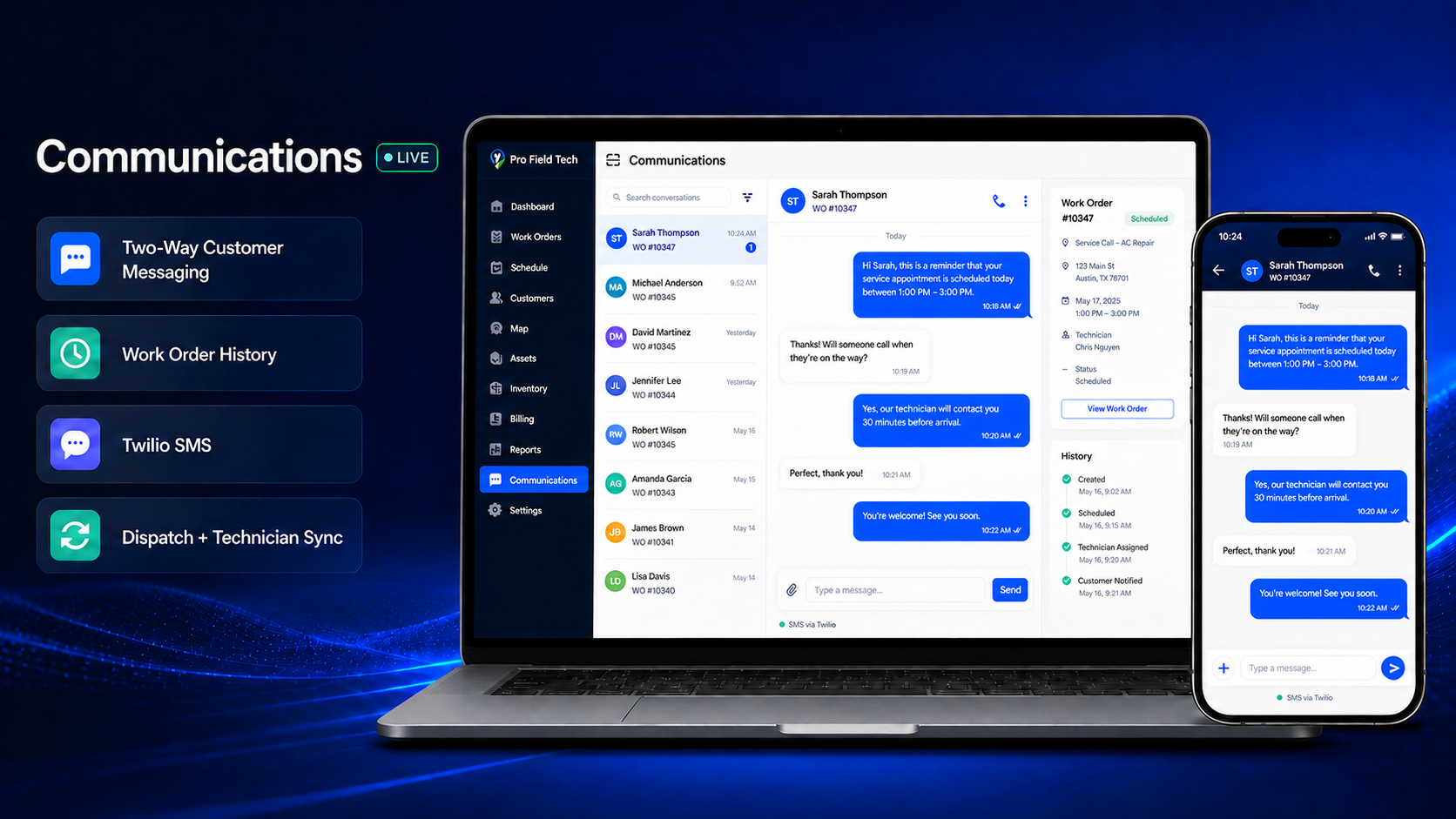
Keep customer conversations connected to the work order from dispatch through completion. Two-way messaging, work-order history, and technician updates stay in one shared view.
- Two-Way Customer Messaging
- Work Order History
- Twilio SMS
- Dispatch + Technician Sync
- Status: Live
Warranty claims. Without the friction.
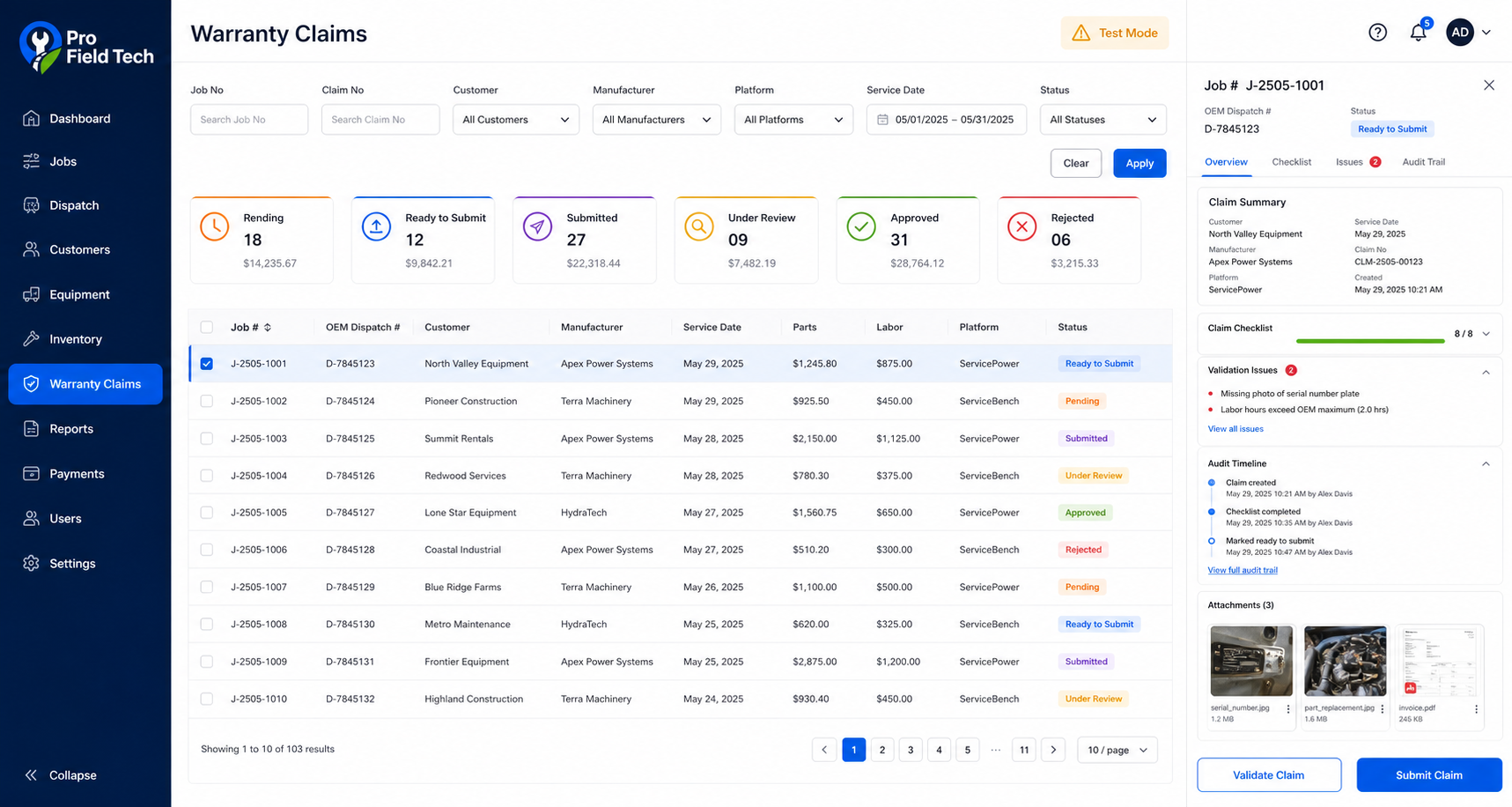
Track every warranty claim through its full lifecycle — status summaries, validation checklists, and a complete audit trail. Portal submission to ServicePower and ServiceBench is in development and not yet active.
- Claim status dashboard: Pending, Ready to Submit, Submitted, Under Review, Approved, Rejected
- Per-claim checklist and validation issue detection
- Full audit trail for every claim action
- Filter by job number, claim number, manufacturer, platform, and date range
- Attachment management — photos, invoices, and documents
- ServicePower portal integration (in development)
- ServiceBench portal integration (planned)
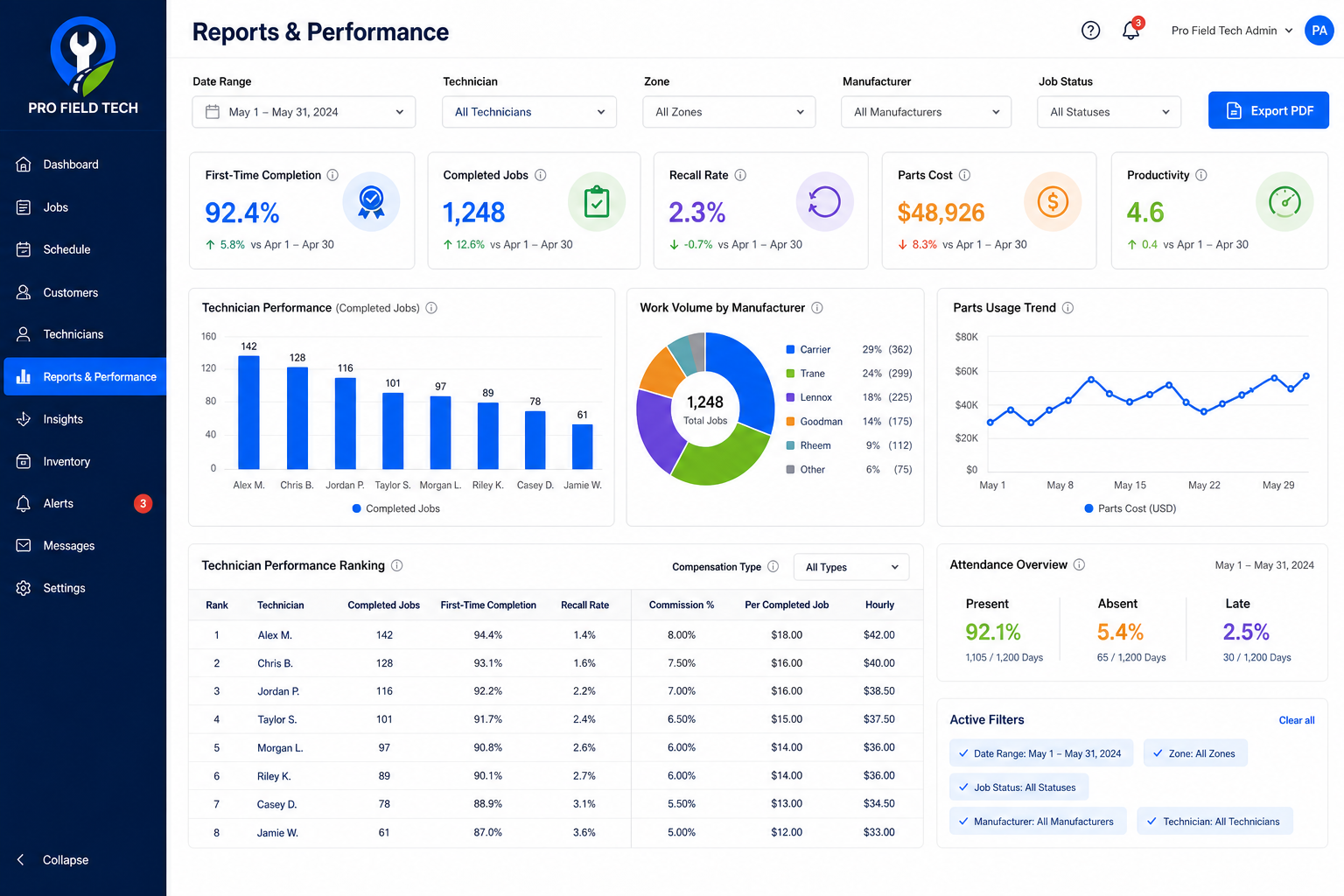
Data that drives. Better decisions.
First-time completion rates, technician productivity, parts cost trends, and work volume by manufacturer — filterable by date, technician, zone, and job status. Export to PDF.
- First-time completion rate with period-over-period comparison
- Technician performance ranking with completed jobs and recall rate
- Work volume by manufacturer — Carrier, Trane, Lennox, Goodman, Rheem, and more
- Parts cost trend chart and usage analytics
- Attendance overview — present, absent, and late rates
- Export to PDF for business reviews and OEM reporting
Keep customers. In the loop.
Automated SMS and email notifications keep customers informed at every stage. The customer portal shows job status, service history, and digital invoices. Stripe payments and Twilio messaging are in development.
- Automated SMS and email job status notifications
- Customer-facing job tracking portal
- Digital invoices with Stripe payment links — Stripe in development
- Service history and appliance records
- Two-way messaging via Twilio — Twilio in development
From first call to final claim
Every step of the service lifecycle is represented in Pro Field Tech — designed to reduce manual handoffs and data re-entry across your operation.
Every step generates data that feeds your reports, AI assistant, and warranty claim workflow automatically.
Integrations
Warranty portals, parts distributors, payments, and messaging — all statuses shown below. Nothing is implied as active.
ServicePower
Warranty claim tracking and workflow management designed to connect with the ServicePower network. Portal submission is in development.
ServiceBench
Claim authorization, parts ordering, and completion reporting workflows aligned with ServiceBench. Integration is planned.
Marcone
Parts catalog search and ordering from Marcone within work orders and the technician app. Integration is in development.
Encompass
Encompass parts search and ordering integrated into the back office and technician app. Integration is in development.
Stripe
Secure payment collection via digital invoices with card and ACH support. Stripe integration is in development.
Twilio
Automated SMS notifications for job status updates and two-way customer messaging. Integration is in development.
Zapier
Connect Pro Field Tech to thousands of apps via Zapier — trigger workflows from job events, status changes, and completed work orders. Integration is in development.
Have a specific integration need? Let us know — we prioritize based on customer demand.
Talk to our teamThe app your technicians will actually use.
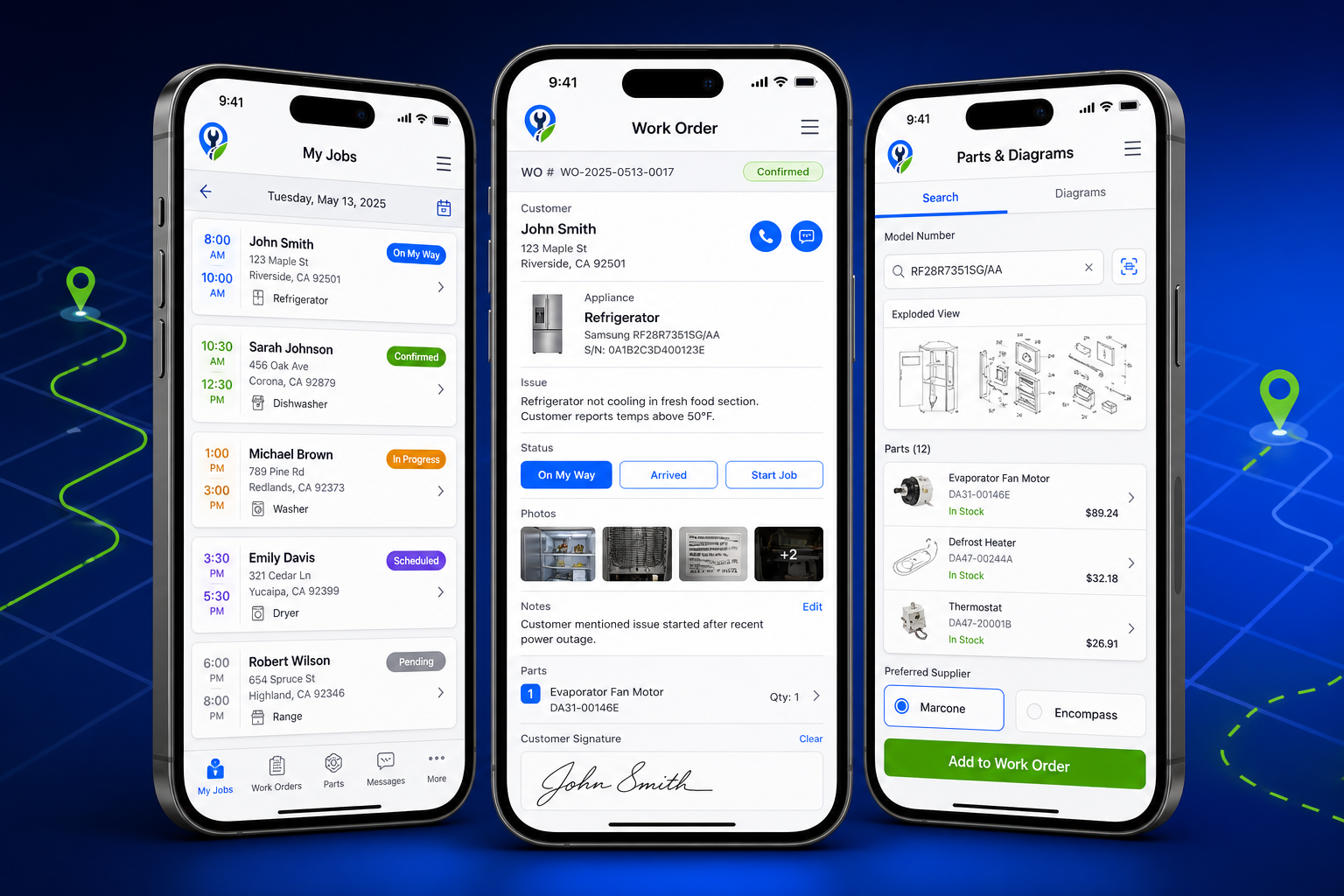
Designed for the field, not the office. The Pro Field Tech iOS app gives technicians a clean, fast interface for managing their day — from the first job to the last signature. Three core screens: My Jobs, Work Order detail, and Parts & Diagrams.
- My Jobs — Full day view with customer names, addresses, appliance types, and real-time status badges.
- Work Order detail — Customer info, appliance model, issue description, photos, parts, and digital signature — all in one screen.
- Parts & Diagrams — Search by model number and view exploded diagrams. Direct ordering from Marcone and Encompass is in development — not yet active.
- AI Assistant — Ask anything about the job. Suggestions only — technician review required before any action.
- Offline mode — Designed to work without a signal. Offline mode is a planned feature — connectivity requirements will be documented at launch.
App Store availability is in private beta. Contact us to join the early access program.
AI that assists. Not replaces.
Pro Field Tech uses AI to reduce administrative friction and surface useful information — while keeping your technicians in control of every decision.
Responsible AI use: All AI-generated content in Pro Field Tech — including diagnostic suggestions, part recommendations, note corrections, and translations — is presented as informational assistance only. Technician review and professional judgment are required before acting on any AI suggestion. Pro Field Tech does not guarantee the accuracy of AI outputs.
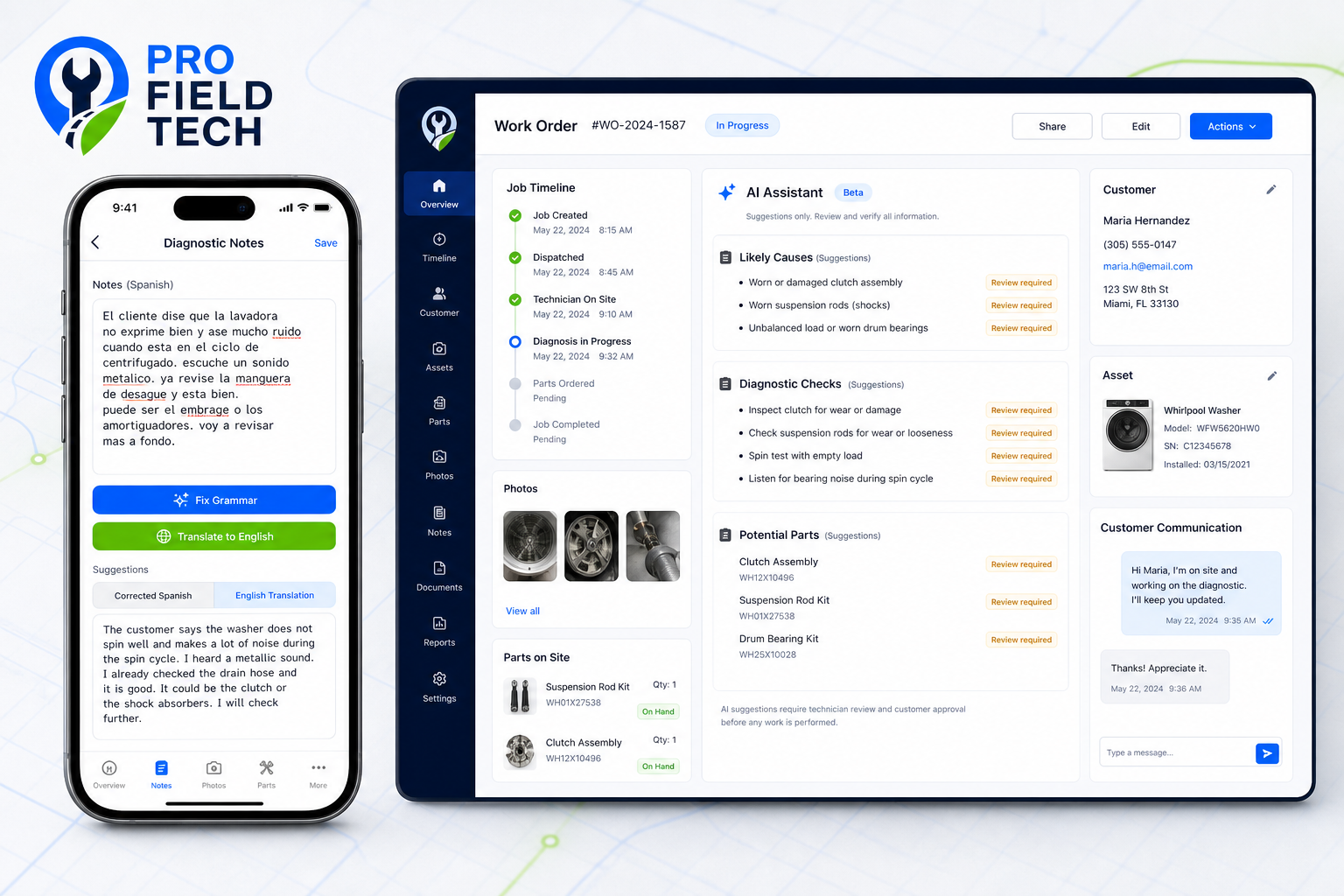
Every AI suggestion is clearly labeled. Technician review is required before any action is taken.
Grammar correction for work order notes
Suggestions onlySuggests clearer phrasing for technician notes. All suggestions require technician review before saving.
Spanish-to-English translation
Suggestions onlyTranslates technician notes written in Spanish to English for back-office review. Accuracy should be verified before use in official documentation.
Diagnostic check suggestions
Review requiredBased on appliance model and reported symptoms, the AI suggests diagnostic steps to consider. Not a diagnosis — technician expertise always takes precedence.
Part suggestions
Review requiredPotentially relevant parts based on appliance model and symptom data. Must be verified by the technician before ordering.
Operational summaries
AI-assistedAI-generated daily and weekly summaries of job activity and technician performance to help managers stay informed.
What's coming next
Pro Field Tech is actively developed. Features labeled "Coming Soon", "Planned", or "In Development" are not yet available. We share our roadmap transparently so you can plan ahead.
Android Technician App
Full-featured Android version of the technician mobile app.
Accounting & QuickBooks
Not currently available. Planned to include invoicing, financial records, and two-way QuickBooks sync.
Customer Self-Scheduling
Let customers book and reschedule appointments through a branded portal.
AI Predictive Maintenance
AI-assisted alerts for appliances with patterns suggesting future failure. Suggestions only — technician review required.
Multi-Location Management
Manage multiple service territories and branch offices from a single account.
Technician GPS Tracking
Real-time GPS breadcrumb tracking for field technicians.
Automated Review Requests
Post-job automated review request via SMS and email.
Advanced AI Reporting
AI-generated operational insights and anomaly detection across your service data.
Have a feature request? We'd love to hear from you. Contact our team →
Plans for every stage of growth
Pro Field Tech is priced based on your team size and feature needs. Contact us for a custom quote tailored to your operation.
Starter
For small teams getting started
Core dispatch, scheduling, and job management for appliance repair businesses with a small team.
- Up to 3 technicians
- Smart dispatch and scheduling
- Work order management
- Customer records
- Basic reporting
- iOS technician app
- Email support
Professional
For growing service operations
Full platform access including AI assistance, warranty claims tracking, and customer portal. Integration features are noted as in development or planned.
- Up to 15 technicians
- Everything in Starter
- AI Work Order Assistant
- Warranty Claims module
- Customer portal
- Advanced reporting
- Priority support
Warranty portal submission (ServiceBench planned), parts ordering (Marcone & Encompass in development), Zapier automation (in development), Stripe payments (in development), and Twilio SMS (in development) are not yet active.
Request PricingEnterprise
For large or multi-location operations
Custom configuration, dedicated onboarding, and enterprise-grade support for complex service organizations.
- Unlimited technicians
- Everything in Professional
- Multi-location management
- Integration prioritization
- Dedicated account manager
- SLA-backed support
- Custom reporting
- SSO and advanced security
All plans include onboarding support. No long-term contracts required. Pricing provided upon request.
Security & data protection
Role-based access, full audit history, tenant isolation, and encrypted data at rest and in transit.
Role-Based Access Control
Granular permissions for dispatchers, technicians, office managers, and administrators. Each role sees only what they need.
Audit History
Every action in the platform is logged with a timestamp and user attribution. Full audit trail for compliance and accountability.
Tenant Separation
Each business account is fully isolated. Your data is never shared with or accessible by other customers on the platform.
Secure Integrations
All third-party integrations (ServicePower, Marcone, Encompass, Zapier, Stripe, Twilio, etc.) use encrypted API connections with credential isolation.
Encrypted Data at Rest
Customer data, work orders, and business records are encrypted at rest and in transit using industry-standard encryption.
Responsible Disclosure
We maintain a responsible security disclosure policy. Security concerns can be reported directly to our engineering team.
How it works
Six steps from first call to final report — the way appliance repair actually runs.
Job creation to dispatch
A service request creates a work order. The dispatcher assigns it from the map view and the technician receives it on their mobile app.
Technician completes the job
On-site, the technician reviews appliance history, captures photos, records parts, and collects a digital signature. AI note assistance is available — all suggestions require review.
Warranty claim preparation
The back office tracks claim status, reviews validation checklists, and manages the audit trail. Portal submission to ServicePower and ServiceBench is in development.
Customer communication
Status notifications are sent at each job stage. Digital invoices are generated at close. Two-way messaging via Twilio is in development.
Performance reporting
Managers review first-time completion rates, technician productivity, and parts costs. Reports are filterable by date, technician, zone, and job status.
Continuous improvement
Every completed job adds to the operational data set — surfacing patterns in recall rates, parts usage, and technician performance over time.
Common questions
Everything you need to know about Pro Field Tech.
Still have questions? Email us at [email protected]
Ready to run a smarter service operation?
Request a personalized demo and see how Pro Field Tech fits your appliance repair operation.
See Pro Field Tech in action
Schedule a personalized demo with our team. We'll walk you through the platform, answer your questions, and help you understand how Pro Field Tech fits your operation.